Glassmorphism tech video — Lavender frosted glass style
Make an elegant tech video in frosted glass: UI cards rising as they come into focus, app icons in a grid and a serif title on a lavender gradient.
รวมอยู่ในแพ็กเกจ Starter พร้อมทั้ง 81 สไตล์และสไตล์ของคุณเอง · ตัวอย่างสร้างโดยเอนจิน ClipOnIt
สไตล์นี้มีลักษณะอย่างไร
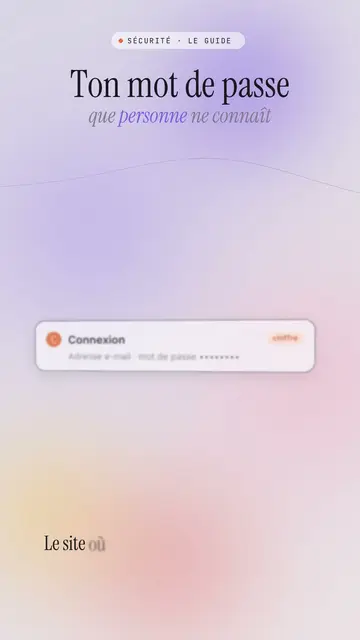
Lavender frosted glass sets your video on a blurred lavender and powder pink gradient, crossed by slowly moving coloured halos. White frosted glass UI cards rise from the bottom and come into focus, then stack up with a soft shadow: a login screen, a notification, a record card. Large app icons line up in a grid, and a smartphone or a 3D cloud can appear in the centre on the spoken word.
The title is an elegant serif, with a grey italic serif subtitle where some words are coloured, and a small spaced-out mono label in capitals above (“SECURITY · THE GUIDE”). A dark terminal can type its lines, a number can roll, and the screen sometimes switches to a black background with the same halos to mark a strong moment. The end shows a “Comment” bar with the word to write.
หัวข้อที่เหมาะกับสไตล์นี้
Avoid: raw, violent or very energetic topics: the style is soft and composed. Also avoid topics unrelated to digital life; the UI cards and icons need a screen to evoke.
- Security and passwordsThe calm, elegant tone reassures on a topic that often scares people.
- Apps and featuresThe icon grid and the smartphone show a use case without a branded screenshot.
- Cloud and AIThe 3D cloud and the stacking cards make visible what happens behind the scenes.
- Premium brands and tech lifestyleFrosted glass and the serif give a polished look, close to a keynote.
ไอเดียวิดีโอในสไตล์นี้
- The website doesn't know your password
The login card coming into focus, the hashing terminal and the subtitle “that nobody knows”.
- 5 apps that replace your planner
The icon grid, the smartphone in the centre and the stacked notification cards.
- Where your photos go when you back them up
The 3D cloud, the rising cards and the switch to a black background.
- Two-factor authentication in 30 seconds
The six-digit code card, the phone and the number of protected accounts.
รับได้ใน 1 คลิก
- เปิดลิงก์ของสไตล์นี้
ปุ่ม “สร้างวิดีโอในสไตล์นี้” จะเปิดตัวแก้ไขพร้อมสไตล์นี้ที่เลือกไว้แล้ว หากยังไม่มีบัญชี การสมัครใช้เวลาประมาณหนึ่งนาทีและไม่ต้องใช้บัตร
- เขียนหัวข้อของคุณในหนึ่งประโยค
ไอเดียเดียวก็เพียงพอ คุณยังวางข้อความ หรือจาก Starter พูดเล่าเรื่องผ่านไมโครโฟนก็ได้ วิดีโอจะสร้างจากเสียงของคุณ
- ตรวจสอบ แล้วเรนเดอร์
AI เขียนฉาก เลือกองค์ประกอบของสไตล์ และจัดจังหวะให้ตรงกับคำพูด พร้อมเสียงและคำบรรยาย คุณแก้ไขส่วนที่ไม่ถูกต้อง จากนั้นไฟล์ MP4 แนวตั้งจะพร้อมภายในไม่กี่นาที
สิ่งที่คุณปรับได้
For each scene you pick the top label, the serif title and its italic subtitle with coloured words, the central visual that appears on the word (cards, icons, cloud, phone, terminal, number or comment) and the background, light by default or black for a strong moment.
คำถามที่พบบ่อย
ฟรีหรือไม่ เอาต์พุต และการใช้งาน: คำตอบสั้นๆ
Are the app icons real brands?
No. The icons are drawn by the engine, with no brand logo. An app's name can appear as text on a card if you write it.
ใช้เสียงของฉันเองได้ไหม?
Yes. Record yourself or import your audio: cards rise and come into focus on your words.
How is it different from Night interface?
Night interface stays dark, on midnight blue, with big numbers and sources. Lavender frosted glass is light and soft, on a pastel gradient, with glass cards coming into focus.
สไตล์นี้มีในแพ็กฟรีหรือไม่?
ไม่ใช่ มาพร้อมกับ Starter ($29/เดือน): วิดีโอไม่มีลายน้ำ 15 วิดีโอต่อเดือน ทั้ง 81 สไตล์และสไตล์ของคุณเอง แพ็กเกจฟรีให้ 3 วิดีโอต่อเดือนพร้อมลายน้ำ ใน 8 สไตล์อื่น: Pixel News, Press paper, Comedy cartoon, Class sketch, Night tale, Social screen, Retro synthwave และ Flat vector.
หากคุณชอบสไตล์นี้
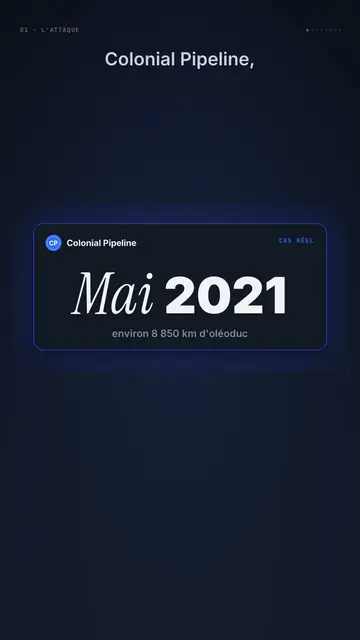
Dark UI tech explainer video
Night interface style · Dark glass cards on midnight blue, narration coming out of blur, blue, cream and black switches.
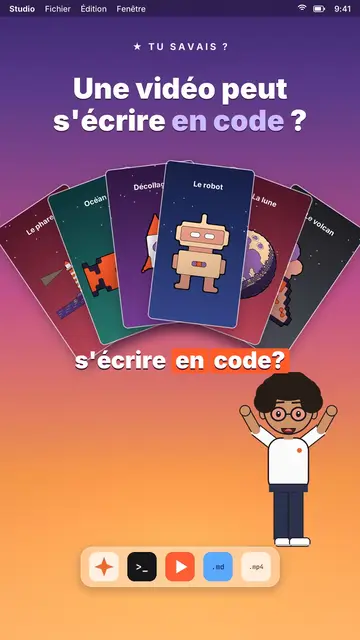
AI coding tutorial video
Twilight desktop style · A fake computer desktop on a violet-pink sunset: windows swinging in 3D, a walking avatar.

UI motion design explainer video
Clean interface style · The story played out in clean interface cards: windows, buttons, a cursor clicking on the word, key word in serif.
ไอเดียของคุณ ในสไตล์นี้
เขียนหนึ่งประโยคหรือพูดออกมา สไตล์จะถูกเลือกไว้แล้วเมื่อคุณเข้าสู่ตัวแก้ไข