AI coding tutorial video — Twilight desktop style
Make an AI or coding tutorial on a fake computer desktop at sunset: terminal and code windows swinging in 3D, video cards in a fan, a walking avatar.
รวมอยู่ในแพ็กเกจ Starter พร้อมทั้ง 81 สไตล์และสไตล์ของคุณเอง · ตัวอย่างสร้างโดยเอนจิน ClipOnIt
สไตล์นี้มีลักษณะอย่างไร
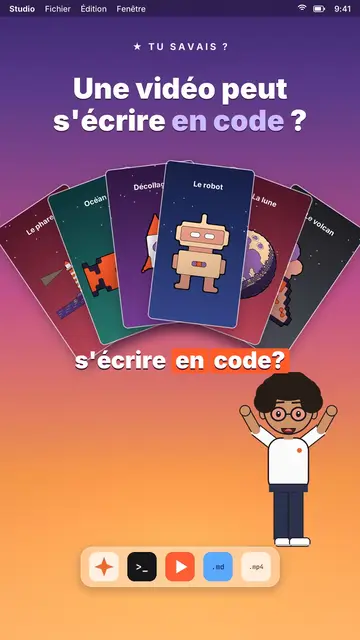
Twilight desktop recreates a computer desktop, with its menu bar at the top and its dock at the bottom, set on a violet, pink and peach sunset gradient. Dark windows swing open in 3D on the spoken word: a terminal typing its commands, a code editor, a recap window, a statistic. Vertical videos spread out in a fan or a grid, and a counter climbs to the announced number.
At the bottom of the screen, a full-body avatar walks from one side to the other and presents, points or raises an arm. The big white title at the top carries one word in lavender, under a small mono kicker (“★ did you know?”). An orange tag pops under a window to say “written by AI”. The end can release an army of avatar clones, then a “Comment” card with a field that types itself and a “Subscribed” card.
หัวข้อที่เหมาะกับสไตล์นี้
Avoid: topics far from the screen, like nature, history or sport: everything happens in a fake operating system. Also avoid emotional stories; the tone stays that of a demo.
- Coding and AI tutorialsThe terminal and the editor show the real command, line by line, as you say it.
- Tech “did you know?” clipsThe kicker and the lavender title ask the question, the swinging window gives the answer.
- Tool showcasesVideo cards in a fan show what the tool produces, without screenshots.
- Growth numbersThe counter climbing in its window makes a result concrete and measurable.
ไอเดียวิดีโอในสไตล์นี้
- A video can be written in code
Video cards in a fan, the editor filling up and the “written by AI” tag.
- Automate a task in 3 commands
The terminal typing each command, the recap and the avatar giving a thumbs up.
- How many hours AI saved me
The stats window, the climbing counter and the grid of finished tasks.
- Make 100 videos from one script
The video grid filling up and the clone army at the end.
รับได้ใน 1 คลิก
- เปิดลิงก์ของสไตล์นี้
ปุ่ม “สร้างวิดีโอในสไตล์นี้” จะเปิดตัวแก้ไขพร้อมสไตล์นี้ที่เลือกไว้แล้ว หากยังไม่มีบัญชี การสมัครใช้เวลาประมาณหนึ่งนาทีและไม่ต้องใช้บัตร
- เขียนหัวข้อของคุณในหนึ่งประโยค
ไอเดียเดียวก็เพียงพอ คุณยังวางข้อความ หรือจาก Starter พูดเล่าเรื่องผ่านไมโครโฟนก็ได้ วิดีโอจะสร้างจากเสียงของคุณ
- ตรวจสอบ แล้วเรนเดอร์
AI เขียนฉาก เลือกองค์ประกอบของสไตล์ และจัดจังหวะให้ตรงกับคำพูด พร้อมเสียงและคำบรรยาย คุณแก้ไขส่วนที่ไม่ถูกต้อง จากนั้นไฟล์ MP4 แนวตั้งจะพร้อมภายในไม่กี่นาที
สิ่งที่คุณปรับได้
For each scene you pick the kicker, the title and its lavender word, the window that opens on the word (terminal, code, recap, stat, video cards or a library element), the orange tag, and the avatar's side and pose. The last scene carries the word to comment.
คำถามที่พบบ่อย
ฟรีหรือไม่ เอาต์พุต และการใช้งาน: คำตอบสั้นๆ
Is the code shown real?
It is the text you write in the script: commands, code lines, results. The engine types it into the window; nothing is executed.
ใช้เสียงของฉันเองได้ไหม?
Yes. Record yourself or import your audio: windows open and the terminal types on your words.
How is it different from Clean interface?
Clean interface plays the story in light windows with a clicking cursor. Twilight desktop sets dark windows swinging in 3D over a sunset, with a walking avatar.
สไตล์นี้มีในแพ็กฟรีหรือไม่?
ไม่ใช่ มาพร้อมกับ Starter ($29/เดือน): วิดีโอไม่มีลายน้ำ 15 วิดีโอต่อเดือน ทั้ง 81 สไตล์และสไตล์ของคุณเอง แพ็กเกจฟรีให้ 3 วิดีโอต่อเดือนพร้อมลายน้ำ ใน 8 สไตล์อื่น: Pixel News, Press paper, Comedy cartoon, Class sketch, Night tale, Social screen, Retro synthwave และ Flat vector.
หากคุณชอบสไตล์นี้

UI motion design explainer video
Clean interface style · The story played out in clean interface cards: windows, buttons, a cursor clicking on the word, key word in serif.
Glassmorphism tech video
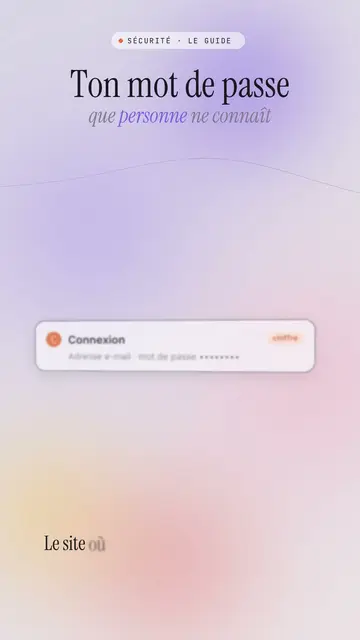
Lavender frosted glass style · Frosted glass UI cards rising and coming into focus on a lavender gradient with halos.
Content creator video
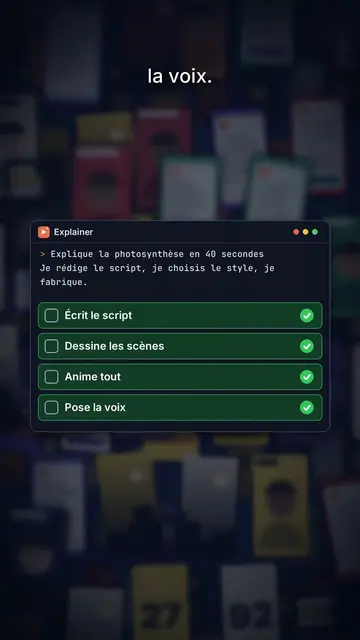
Thumbnail wall style · A midnight blue wall of video thumbnails in depth, a zoom through the wall, gold numbers.
ไอเดียของคุณ ในสไตล์นี้
เขียนหนึ่งประโยคหรือพูดออกมา สไตล์จะถูกเลือกไว้แล้วเมื่อคุณเข้าสู่ตัวแก้ไข