วิดีโอข่าวแบบตัดกระดาษ — สไตล์ Press paper
สร้างวิดีโอข่าวแบบตัดกระดาษ: กระดาษครีม ภาพเอกสารเก่าติดเทป แบนเนอร์ และตราประทับ สำหรับการทบทวนข่าว ประวัติศาสตร์ และหัวข้อที่มีแหล่งอ้างอิง สไตล์อิสระ
ในแผนฟรี: 3 วิดีโอต่อเดือนพร้อมลายน้ำ · ตัวอย่างเรนเดอร์โดยเอนจิน ClipOnIt
สไตล์นี้มีลักษณะอย่างไร
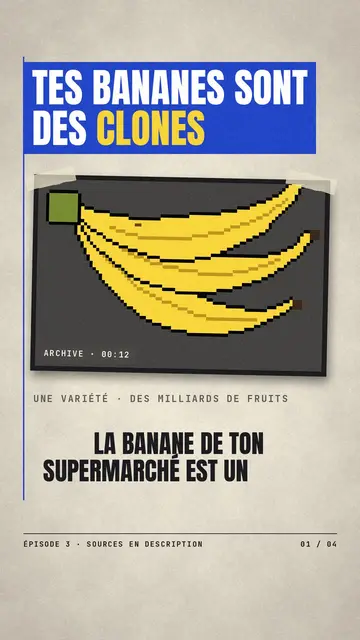
Press paper builds every scene like a collage on a newspaper page: cream paper with grain and fibres, a condensed headline in a blue banner, a vertical rule splitting the blocks, and in the middle an archive image in a dark frame, slightly tilted and held down with tape. A typewriter-style caption sits inside the image, like a dated excerpt, with a short line of text under the frame.
Quotes come in on a red banner, a rough-inked stamp hits the word that matters, and the condensed captions are highlighted in yellow like a marker pen. A footer names the episode and points to the sources. The render stays 2D: it evokes the cut-and-pasted paper of a press review, without frame-by-frame animation of paper pieces.
หัวข้อที่เหมาะกับสไตล์นี้
Avoid: topics that need motion or action (sport, stunts, a scene unfolding): the layout stays that of a still page. Topics with no sources at all fit it poorly too, since the style puts references up front; for a made-up story, a tale or cartoon style works better.
- Press reviewsOne headline per scene, a quote on a red banner, the source in the footer: the format borrows the newspaper's codes.
- History and archivesThe taped image in its dark frame gives an old photo or document the place of an archive exhibit.
- Fact-checkingThe red stamp settles it (“FALSE”, “VERIFIED”) and the quote shows exactly what was said.
- Economy and consumer topicsPrices, brands, shopping habits: the editorial tone makes an everyday topic serious and sourced.
ไอเดียวิดีโอในสไตล์นี้
- Why bananas are clones
A taped plantation photo, the headline on a blue banner and a “CLONES” stamp on the key word.
- The week's press review
One scene per story, each with its headline, its quote in red and its source in the footer.
- A quote put back in context
The full sentence on a red banner, then the date and place in the archive image's caption.
- This day in history
An archive event told in four clippings: before, the moment, the reaction, what remains of it.
รับได้ใน 1 คลิก
- เปิดลิงก์ของสไตล์นี้
ปุ่ม “สร้างวิดีโอในสไตล์นี้” จะเปิดตัวแก้ไขพร้อมสไตล์นี้ที่เลือกไว้แล้ว หากยังไม่มีบัญชี การสมัครใช้เวลาประมาณหนึ่งนาทีและไม่ต้องใช้บัตร
- เขียนหัวข้อของคุณในหนึ่งประโยค
ไอเดียเดียวก็เพียงพอ คุณยังวางข้อความ หรือจาก Starter พูดเล่าเรื่องผ่านไมโครโฟนก็ได้ วิดีโอจะสร้างจากเสียงของคุณ
- ตรวจสอบ แล้วเรนเดอร์
AI เขียนฉาก เลือกองค์ประกอบของสไตล์ และจัดจังหวะให้ตรงกับคำพูด พร้อมเสียงและคำบรรยาย คุณแก้ไขส่วนที่ไม่ถูกต้อง จากนั้นไฟล์ MP4 แนวตั้งจะพร้อมภายในไม่กี่นาที
สิ่งที่คุณปรับได้
You can change the blue banner headline, the overline, the stamp word, the red quote and the image caption, as well as the series name and the footer source. Each scene takes an image you import (a PNG or JPG you own the rights to) or elements from the library. Theme colours (accent, background, ink, blue, marker) can be set; you can also ask for three variants of a scene and change its length or narration.
Frequently asked questions
ฟรีหรือไม่ เอาต์พุต และการใช้งาน: คำตอบสั้นๆ
Is it real paper cutout animation?
It is a 2D render that imitates press collage: cream paper, taped images, banners and a stamp. Pieces are not animated frame by frame as in stop motion; they come in and settle to the rhythm of the voice.
Can I use my own archive images?
Yes, each scene can take an image you import, placed in the taped frame. Use images you own or that are free to use, and name the source in the footer.
Can I turn it into a series?
Yes. The series name and the source show in the footer of every video, and the layout stays the same from one episode to the next. Check facts, dates and quotes before each release.
สไตล์นี้มีในแพ็กฟรีหรือไม่?
ใช่ เป็นหนึ่งใน 8 สไตล์ในแผนฟรี: 3 วิดีโอต่อเดือนพร้อมลายน้ำ ClipOnIt ไม่ต้องใช้บัตรเครดิต Starter ($29/เดือน) เอาลายน้ำออก ได้ 15 วิดีโอต่อเดือน และปลดล็อกทั้ง 24 สไตล์ บวกสไตล์ของคุณเอง
หากคุณชอบสไตล์นี้
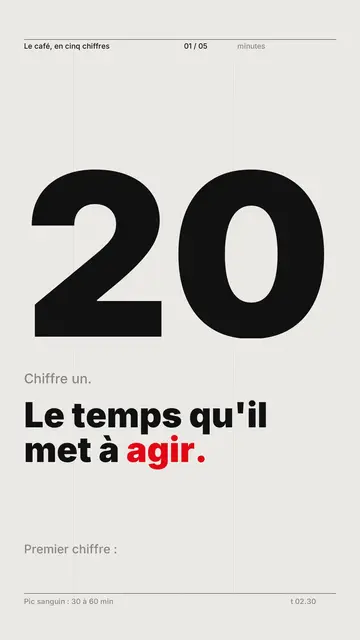
Kinetic typography video maker
Swiss grid style · Swiss typography: light paper, strict grid, giant figure, one signal colour.
- ฟรี
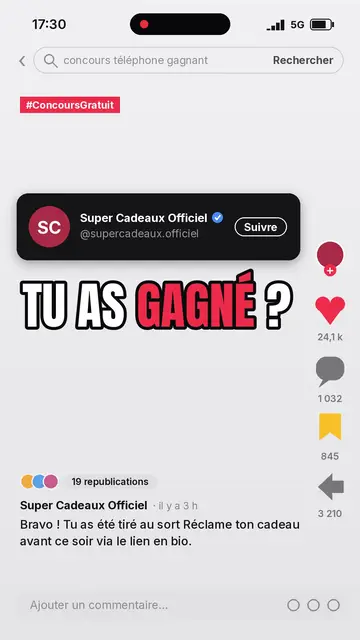
Social media explainer video
Social screen style · A recreated social feed: profile, counters, comments.
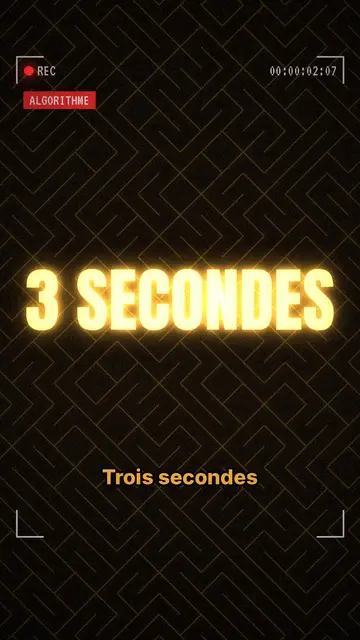
True crime mystery video maker
Glowing investigation style · Glowing gold headlines, dark textured backdrop, REC frame.
ไอเดียของคุณ ในสไตล์นี้
เขียนหนึ่งประโยคหรือพูดออกมา สไตล์จะถูกเลือกไว้แล้วเมื่อคุณเข้าสู่ตัวแก้ไข