วิดีโออธิบายสำหรับโซเชียลมีเดีย — สไตล์หน้าจอโซเชียล
สร้างวิดีโออธิบายสำหรับโซเชียลมีเดีย: จำลองโปรไฟล์ โพสต์ ตัวนับ และคอมเมนต์ เพื่ออธิบายเทรนด์ ครีเอเตอร์ และอัลกอริทึม สไตล์อิสระ ใน 1 คลิก
ในแผนฟรี: 3 วิดีโอต่อเดือนพร้อมลายน้ำ · ตัวอย่างเรนเดอร์โดยเอนจิน ClipOnIt
สไตล์นี้มีลักษณะอย่างไร
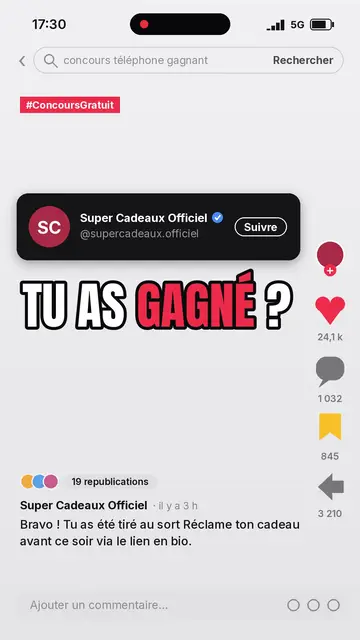
Social screen recreates a social network interface and uses it as the backdrop for an explanation. The interface is generic: no real logo or brand, only the conventions everyone recognises. At the top, a status bar and a search bar showing the topic being typed, then a red tag. A dark profile card introduces an account, with an initials avatar, a badge and a button that gets pressed halfway through the scene.
In the middle, a big condensed outlined headline, then the post's media: an imported image or a drawing from the pixel art library. On the side, an action column with its counters, the heart beating halfway through. The post text can stay fixed or follow the voice word by word, and a comment bar closes the screen. Viewers feel like they are scrolling their feed while something is being explained to them.
หัวข้อที่เหมาะกับสไตล์นี้
Avoid: topics unrelated to the internet (ancient history, natural science, geography): the app backdrop feels out of place. Also avoid presenting a real person or brand as the author of an invented post; stick to fictional accounts or public facts.
- Trends and viral momentsShowing how a post takes off from zero, with the counters climbing, speaks to anyone who scrolls.
- AlgorithmsThe search bar, profile and counters give concrete objects to explain what the platform measures.
- Online safetySpotting a fake account, a scam or fake news becomes visual: the suspicious profile is shown as you would see it.
- Marketing and creatorsA posting tip, an account strategy or a case study is told in the format it lives in.
ไอเดียวิดีโอในสไตล์นี้
- Spot a fake account in 30 seconds
The profile appears, then each scene points at one sign: stolen avatar, inflated counters, repeated comments.
- How a trend takes off
A post at zero, then hearts and shares climbing scene after scene, with the reason behind each jump.
- What the algorithm really looks at
The search bar types the question, then watch time, shares and comments come up one by one.
- An online controversy explained
The original post, the reactions in the comments, then what happened next: it all fits on the phone screen.
รับได้ใน 1 คลิก
- เปิดลิงก์ของสไตล์นี้
ปุ่ม “สร้างวิดีโอในสไตล์นี้” จะเปิดตัวแก้ไขพร้อมสไตล์นี้ที่เลือกไว้แล้ว หากยังไม่มีบัญชี การสมัครใช้เวลาประมาณหนึ่งนาทีและไม่ต้องใช้บัตร
- เขียนหัวข้อของคุณในหนึ่งประโยค
ไอเดียเดียวก็เพียงพอ คุณยังวางข้อความ หรือจาก Starter พูดเล่าเรื่องผ่านไมโครโฟนก็ได้ วิดีโอจะสร้างจากเสียงของคุณ
- ตรวจสอบ แล้วเรนเดอร์
AI เขียนฉาก เลือกองค์ประกอบของสไตล์ และจัดจังหวะให้ตรงกับคำพูด พร้อมเสียงและคำบรรยาย คุณแก้ไขส่วนที่ไม่ถูกต้อง จากนั้นไฟล์ MP4 แนวตั้งจะพร้อมภายในไม่กี่นาที
สิ่งที่คุณปรับได้
For each scene you choose the search text, the red tag, the account name and handle, the button label, the headline, the post text and the four counters. The status bar clock and the main account are set for the whole video. The media can be an image of yours or library elements, which you move or swap; you can also ask for three variants of a scene, change its length and narration, and adapt the theme colours. From Starter, your own voice and the AI Director are available.
Frequently asked questions
ฟรีหรือไม่ เอาต์พุต และการใช้งาน: คำตอบสั้นๆ
Does the style use a real social network's logo?
No. The interface is recreated and generic: people recognise a social feed without any real platform's logo, name or branding appearing.
Can I add my own screenshot or image?
Yes, an imported image becomes the post's media. Check that you have the right to show it, especially if people appear in it.
Which platforms is the video made for?
The MP4 comes out vertical at 1080×1920, with voice and captions built in: it posts as is on TikTok, Reels and Shorts.
สไตล์นี้มีในแพ็กฟรีหรือไม่?
ใช่ เป็นหนึ่งใน 8 สไตล์ในแผนฟรี: 3 วิดีโอต่อเดือนพร้อมลายน้ำ ClipOnIt ไม่ต้องใช้บัตรเครดิต Starter ($29/เดือน) เอาลายน้ำออก ได้ 15 วิดีโอต่อเดือน และปลดล็อกทั้ง 24 สไตล์ บวกสไตล์ของคุณเอง
หากคุณชอบสไตล์นี้
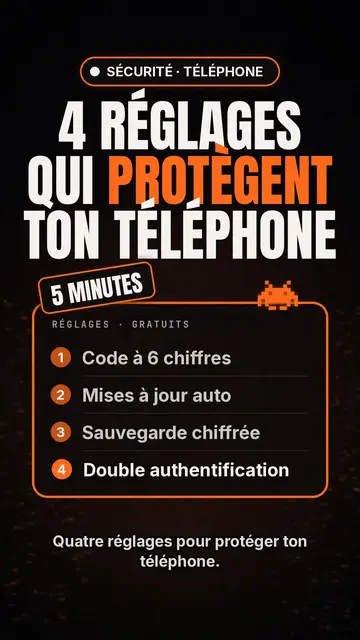
Tech top list video maker
Tech list style · Tech card on black, glowing badge, numbered list.
- ฟรี
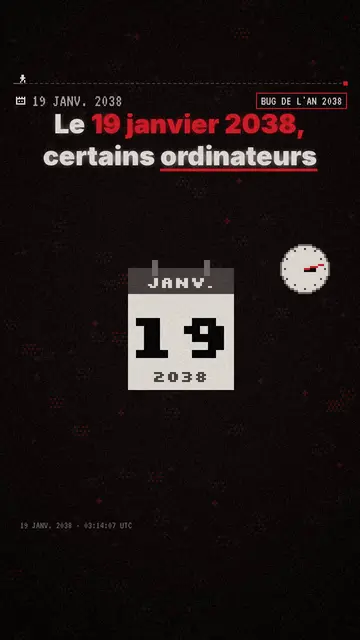
Pixel art explainer video maker
Pixel News style · Grey-and-red pixel art, dated HUD, word-by-word captions.
- ฟรี
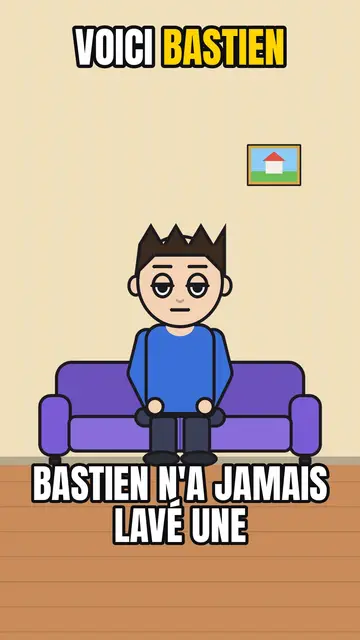
AI cartoon video generator
Comedy cartoon style · Comic cartoon, expressive characters with bold outlines.
ไอเดียของคุณ ในสไตล์นี้
เขียนหนึ่งประโยคหรือพูดออกมา สไตล์จะถูกเลือกไว้แล้วเมื่อคุณเข้าสู่ตัวแก้ไข