วิดีโออธิบายแผนที่ดาวเทียม — สไตล์บรีฟดาวเทียม
สร้างวิดีโออธิบายจากภาพดาวเทียมจริง: ภาพบินผ่าน หมุด เส้นทาง และแหล่งที่มาบนหน้าจอ สร้างเพื่อภูมิศาสตร์ ความขัดแย้ง เส้นทางการค้า และข่าวสาร
รวมอยู่ในแพ็กเกจ Starter พร้อมทั้ง 24 สไตล์และสไตล์ของคุณเอง · ตัวอย่างสร้างโดยเอนจิน ClipOnIt
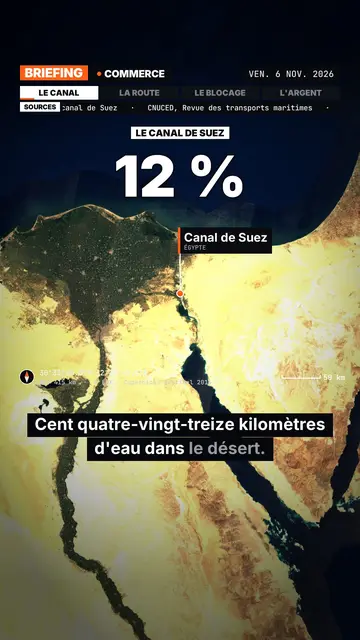
สไตล์นี้มีลักษณะอย่างไร
Satellite briefing tells your topic from above, on real satellite imagery. In each scene, the camera climbs then dives onto the next place, and drops a pin with the place's name and country. It can also point at several places at once or draw a route between two points, with labelled ends: a shipping lane, a pipeline, a front line.
Around the map sits an investigation-desk frame: series label, topic, date, chapter tabs and a scrolling “Sources” line that includes the imagery credit. Instruments fill out the screen (compass, coordinates, altitude, scale bar). On the dimmed map, an inset can show a library element, an image you import or data bars, and captions light up word by word.
หัวข้อที่เหมาะกับสไตล์นี้
Avoid: topics that do not happen anywhere in particular (psychology, tips, abstract ideas) and indoor scenes: the map then has nothing to show. The imagery is a cloud-free mosaic from a single year, so it cannot show a recent change on the ground.
- Geography and bordersShowing where a strait, an enclave or a disputed border sits beats describing it.
- Conflicts and world newsPins and routes place the facts, and the sources line reminds viewers where the information comes from.
- Trade and supply chainsA cargo ship crossing a canal, coffee crossing an ocean: the drawn route makes the journey obvious.
- MegaprojectsA dam, a new city or an airport makes more sense when you can see its footprint on the ground.
ไอเดียวิดีโอในสไตล์นี้
- Why the Suez Canal matters so much
The camera follows a cargo ship from Asia to Europe, then draws the detour around Africa if the canal closes.
- The journey of a coffee bean
A pin on a plantation, another on a port, then the route all the way to your cup.
- What is at stake in a strait
Zoom on the passage, the bordering countries pinned, and data bars on the traffic going through.
- A city built in the desert
A flyover of the site, a scale bar on screen, and an inset with the project image you import.
รับได้ใน 1 คลิก
- เปิดลิงก์ของสไตล์นี้
ปุ่ม “สร้างวิดีโอในสไตล์นี้” จะเปิดตัวแก้ไขพร้อมสไตล์นี้ที่เลือกไว้แล้ว หากยังไม่มีบัญชี การสมัครใช้เวลาประมาณหนึ่งนาทีและไม่ต้องใช้บัตร
- เขียนหัวข้อของคุณในหนึ่งประโยค
ไอเดียเดียวก็เพียงพอ คุณยังวางข้อความ หรือจาก Starter พูดเล่าเรื่องผ่านไมโครโฟนก็ได้ วิดีโอจะสร้างจากเสียงของคุณ
- ตรวจสอบ แล้วเรนเดอร์
AI เขียนฉาก เลือกองค์ประกอบของสไตล์ และจัดจังหวะให้ตรงกับคำพูด พร้อมเสียงและคำบรรยาย คุณแก้ไขส่วนที่ไม่ถูกต้อง จากนั้นไฟล์ MP4 แนวตั้งจะพร้อมภายในไม่กี่นาที
สิ่งที่คุณปรับได้
You can write the series label, topic, date and chapters on the bar, the list of sources, the stamp title, the kicker and the big figure. Places are given by name: AI puts them on the map, and you can add pins or draw a route. For an inset, pick a library element, import your image or enter data bars. Length, narration and three variants per scene stay adjustable; from Starter, your own voice and the AI Director.
Frequently asked questions
ฟรีหรือไม่ เอาต์พุต และการใช้งาน: คำตอบสั้นๆ
Is the satellite imagery real?
Yes. The views come from a public, cloud-free satellite mosaic, credited on screen and in the sources line. They are archive images, not live views.
Does the AI make up sources?
No. The script is written never to invent a source: you add your own, and the “Sources” line shows what you provided.
How far can it zoom in?
Down to the scale of a city or a large site, such as a port or a dam. You cannot make out a single house or car.
สไตล์นี้มีในแพ็กฟรีหรือไม่?
ไม่ใช่ มาพร้อมกับ Starter ($29/เดือน): วิดีโอไม่มีลายน้ำ 15 วิดีโอต่อเดือน ทั้ง 24 สไตล์และสไตล์ของคุณเอง แพ็กเกจฟรีให้ 3 วิดีโอต่อเดือนพร้อมลายน้ำ ใน 8 สไตล์อื่น: Pixel News, Press paper, Comedy cartoon, Class sketch, Night tale, Social screen, Retro synthwave และ Flat vector.
หากคุณชอบสไตล์นี้
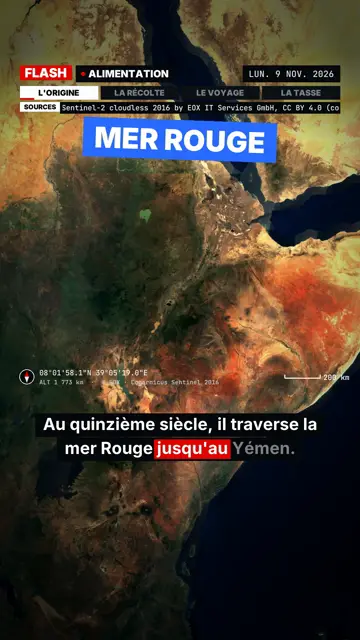
Breaking news explainer video
Flash brief style · News without a dull second: slammed captions, word-tracking box, satellite map and black panels.
- ฟรี
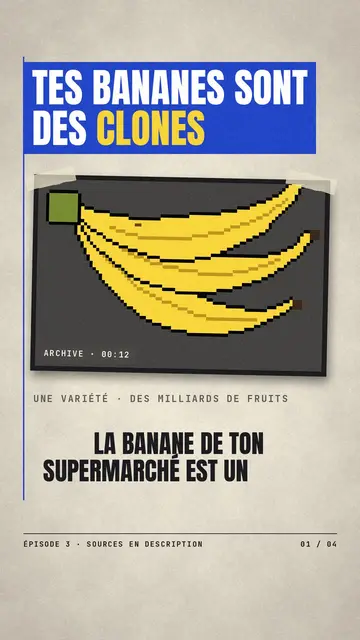
วิดีโอข่าวตัดกระดาษ
สไตล์กระดาษข่าว · กระดาษครีมสไตล์บรรณาธิการ แถบสีน้ำเงินและแดง และตราประทับ
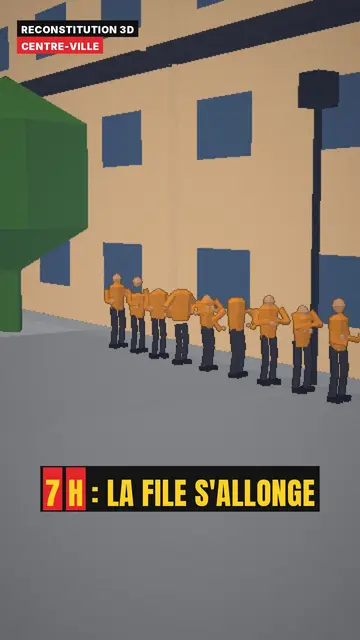
3D reconstruction animation
3D reconstruction style · Colourful daylight low-poly streets and interiors.
ไอเดียของคุณ ในสไตล์นี้
เขียนหนึ่งประโยคหรือพูดออกมา สไตล์จะถูกเลือกไว้แล้วเมื่อคุณเข้าสู่ตัวแก้ไข