Versus comparison video — Arcade fighter style
Make a versus comparison like an arcade fighting game: two pixel robot boxers, health bars, FIGHT! and K.O.!, stat sheets and a high score table.
รวมอยู่ในแพ็กเกจ Starter พร้อมทั้ง 81 สไตล์และสไตล์ของคุณเอง · ตัวอย่างสร้างโดยเอนจิน ClipOnIt
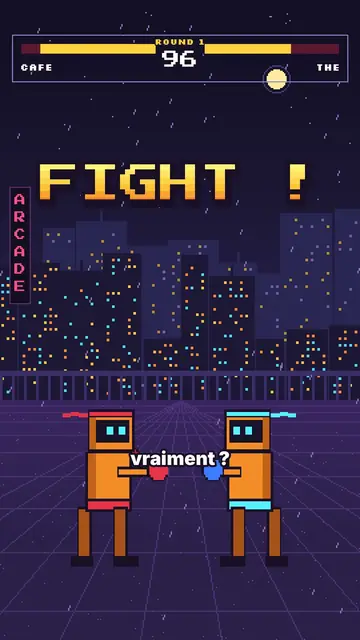
สไตล์นี้มีลักษณะอย่างไร
Arcade fighter turns your topic into a retro brawl. In a purple night street, in front of a pixel city under the rain, two orange robot boxers face each other. At the top, the arcade HUD shows their names, their health bars, the round number and the timer. “FIGHT!” bursts out in big yellow-orange pixel type, and when an argument wins, the opponent drops with a white flash and a “K.O.!”.
Between rounds, the game brings out all its screens: a rolling pixel counter, a “CONTINUE?” with its countdown, a grid select screen where the cursor picks a fighter, stat sheets popping on a striped background, a high score table. Scenes open with an iris, text pops, and a crowd of robots can flood the foreground when you need to show “a hundred versions”.
หัวข้อที่เหมาะกับสไตล์นี้
Avoid: serious, sad or sensitive topics: the brawl tone and the K.O.s would make them feel wrong. Also avoid topics with no opposition or ranking; the style needs two sides or a score.
- “X vs Y” comparisonsTwo names in the HUD, one round per criterion and a K.O. for the winner: the format is built in.
- RankingsThe select screen and the high score table rank the options like in a game.
- Tech and AITwo models, two phones, two apps: stat sheets compare the key numbers.
- Gaming videosViewers recognise the arcade codes and stay to see who goes down.
ไอเดียวิดีโอในสไตล์นี้
- Coffee vs tea
Both names in the HUD, a caffeine round, a sleep round and the final stat sheet.
- iPhone vs Android
Three rounds, a K.O. per criterion and the score table at the end.
- The best free editing tool
The grid select screen, the cursor picking and the winner's sheet.
- Why we give up on our resolutions
You vs laziness, the CONTINUE countdown and the number of days held.
รับได้ใน 1 คลิก
- เปิดลิงก์ของสไตล์นี้
ปุ่ม “สร้างวิดีโอในสไตล์นี้” จะเปิดตัวแก้ไขพร้อมสไตล์นี้ที่เลือกไว้แล้ว หากยังไม่มีบัญชี การสมัครใช้เวลาประมาณหนึ่งนาทีและไม่ต้องใช้บัตร
- เขียนหัวข้อของคุณในหนึ่งประโยค
ไอเดียเดียวก็เพียงพอ คุณยังวางข้อความ หรือจาก Starter พูดเล่าเรื่องผ่านไมโครโฟนก็ได้ วิดีโอจะสร้างจากเสียงของคุณ
- ตรวจสอบ แล้วเรนเดอร์
AI เขียนฉาก เลือกองค์ประกอบของสไตล์ และจัดจังหวะให้ตรงกับคำพูด พร้อมเสียงและคำบรรยาย คุณแก้ไขส่วนที่ไม่ถูกต้อง จากนั้นไฟล์ MP4 แนวตั้งจะพร้อมภายในไม่กี่นาที
สิ่งที่คุณปรับได้
For each scene you pick the shot (duel, solo, number, continue, select, sheet, scores or end), the big pixel announcement and its line below, the HUD names and round, which fighter falls and on which word, the crowd, the white flash and the word to comment.
คำถามที่พบบ่อย
ฟรีหรือไม่ เอาต์พุต และการใช้งาน: คำตอบสั้นๆ
Do accents work in the pixel font?
Big pixel announcements are written without accents, like on an arcade cabinet. Captions keep the full spelling.
ใช้เสียงของฉันเองได้ไหม?
Yes. Record yourself or import your audio: hits, K.O.s and screens land on your words.
How is it different from Pixel RPG quest?
Pixel RPG quest tells a tutorial as a quest, with a checklist and inventory. Arcade fighter pits two sides against each other, round after round, until the K.O.
สไตล์นี้มีในแพ็กฟรีหรือไม่?
ไม่ใช่ มาพร้อมกับ Starter ($29/เดือน): วิดีโอไม่มีลายน้ำ 15 วิดีโอต่อเดือน ทั้ง 81 สไตล์และสไตล์ของคุณเอง แพ็กเกจฟรีให้ 3 วิดีโอต่อเดือนพร้อมลายน้ำ ใน 8 สไตล์อื่น: Pixel News, Press paper, Comedy cartoon, Class sketch, Night tale, Social screen, Retro synthwave และ Flat vector.
หากคุณชอบสไตล์นี้
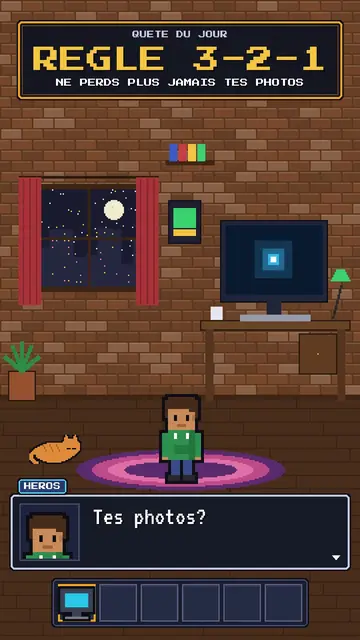
RPG-style tutorial video
Pixel RPG quest style · A tutorial played as a pixel art video game quest: checklist, dialogue box, inventory, spells.
- ฟรี
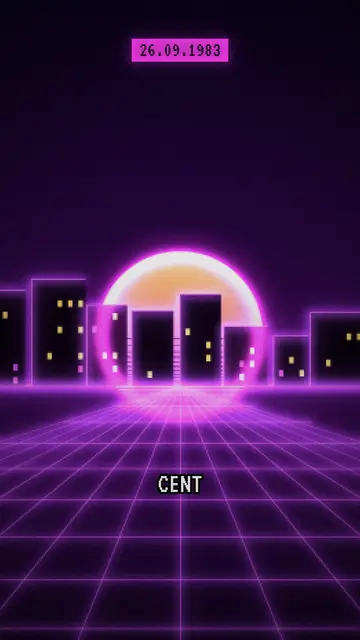
เครื่องมือสร้างวิดีโอ Synthwave
สไตล์ Retro synthwave · พิกเซลอาร์ตโทนม่วงชมพู ดวงอาทิตย์ลายเส้น กริดนีออน
- ฟรี
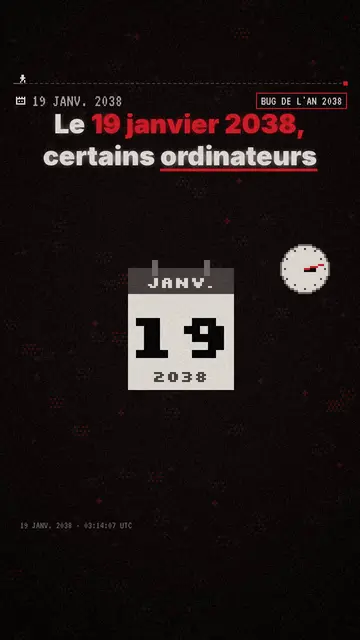
เครื่องมือสร้างวิดีโออธิบายด้วยพิกเซลอาร์ต
สไตล์ Pixel News · พิกเซลอาร์ตสีเทาและแดง HUD แสดงวันที่ และคำบรรยายทีละคำ
ไอเดียของคุณ ในสไตล์นี้
เขียนหนึ่งประโยคหรือพูดออกมา สไตล์จะถูกเลือกไว้แล้วเมื่อคุณเข้าสู่ตัวแก้ไข